Detect Hidden Devices: DarkEye
- 4.7
- Rating
- 100.00K
- Installs
- Free
- Price

 Analysis by App-foxy
I installed Detect Hidden Devices: DarkEye to see whether it could become a practical part of a privacy check rather than just another novelty tool. It is a free tools app from One Music Player, aimed at finding possible hidden cameras and microphones while also offering video recording. The idea is immediately useful: before settling into a hotel room, rental, changing area, or unfamiliar office, you may want a quick way to look for suspicious devices.
My first impression was that DarkEye is best understood as an inspection assistant, not a professional security instrument. That distinction matters. It can help you notice clues you might otherwise overlook, but it cannot turn a phone into a guaranteed detector for every concealed camera or listening device. Used with realistic expectations, it offers a convenient first pass. Used as proof that a room is completely safe, it can create false confidence.
Starting with a real privacy concern
The most sensible way to use DarkEye is to begin with a specific concern. Imagine arriving at a short-term rental after dark. You put your bag down, connect to the room Wi-Fi, and notice a small object aimed toward the bed. It might be an ordinary sensor, a decorative item, or something more worrying. Instead of relying only on a quick visual glance, you open the app and work through the room methodically.
You May Also Like

 Blood Strike: 2.5 Anniversary
Blood Strike’s Loadouts Turn Every Drop Into a Tactical Gamble
A close look at Blood Strike’s custom loadouts: how fast access to signature weapons reshapes its battle royale rhythm, rewards preparation, and narrows the gap between fights.

 Pandora - Music & Podcasts
Pandora’s Music Is Easy to Start, but Harder to Recover
Pandora’s strength is its low-effort path from a seed to a station. Its weak spot is how much confidence it asks you to place in connection, setup, and quiet recovery.

 8 Ball Pool
 Is Built on Rivalries, Rematches, and Routine
A close look at the rivalries, rematches, shared routines, and unanswered safety questions that turn a quick pool match into a persistent mobile community.

 Samsung Music
’s Quiet Strength Is Playing What You Already Own
Its reach comes less from spectacle than from dependable access to a personal library. That simplicity is both the app’s strongest retention engine and its ceiling.

 AccuWeather: Weather Radar
AccuWeather Review: A Quick, Clear Forecast for Everyday Decisions
For everyday plans, the best forecast is the one you can understand quickly. AccuWeather makes rain timing, radar, and local conditions easy to act on, with a few trade-offs.

 Hill Climb Racing
Why Hill Climb Racing Still Turns Crashes Into One More Run
A tiny car, a bumpy hill and one more upgrade: Hill Climb Racing keeps resurfacing because its simple chaos makes every near-miss feel personal.
More From Our News Desk



That starting condition is important because the app is not a replacement for awareness. A hidden device still needs to be positioned somewhere, powered somehow, and aimed at an area that matters. I would first inspect smoke alarms, clocks, chargers, picture frames, air fresheners, vents, light fixtures, and unfamiliar electronics. DarkEye becomes more useful after that initial sweep, when I have a shortlist of objects worth checking rather than waving the phone randomly around the room.
The app’s store summary focuses on detecting hidden cameras and microphones and recording video, while its short store label is DarkEye. In practice, I found the concept easiest to appreciate when treated as a repeatable routine: observe the environment, use the app for additional clues, record anything worth documenting, and then decide what action is justified.
How I would run the room check
I would begin at the entrance and move around the room in one direction, checking each wall and surface once before returning to suspicious areas. This avoids a common mistake with scanning tools: moving unpredictably and then forgetting which objects have already been examined. A slow, organized sweep gives the app a useful role in a larger process.
Next, I would hold the phone steadily near objects that have a clear view of private spaces. The goal is not to treat every alert or visual clue as a verdict. It is to compare what the app suggests with what my eyes can see. A device that appears suspicious but has an obvious everyday purpose deserves a different response from a concealed object with no clear explanation.
One practical tip is to check the same area from more than one angle. A lens or reflective surface may be difficult to notice from the doorway but easier to recognize when light and viewing angle change. I would also repeat the sweep after turning off unnecessary lights if the room allows it, then restore normal lighting before leaving. This two-pass approach is more useful than trusting a single movement through the space.
DarkEye can also be part of documentation. If I find an object that concerns me, recording video can preserve its location and appearance before I touch anything. That is a small but meaningful workflow improvement: the recording becomes a handoff to a property manager, hotel desk, platform support team, or local authority. It is much clearer to say where an object was found and what it looked like than to rely on memory after moving it.
Turning a scan into an actionable handoff
The strongest use case I found is not simply “scan and relax.” It is “scan, identify, document, and escalate when needed.” If the app points me toward something suspicious, I would first take a wider view showing the object in the room, then a closer view showing its details. I would avoid dismantling fixtures or handling unknown electronics. The purpose of the recording is to preserve context, not to investigate hardware physically.
This is where the video feature can matter more than the detection claim itself. A short record can help another person understand the concern without being present. For example, a manager may be able to recognize a legitimate smoke detector immediately, while a concealed or altered object may deserve a closer inspection. The recording does not prove what the device is, but it makes the next conversation more precise.
I would also keep the handoff factual. Instead of saying that DarkEye proved a camera was present, I would describe the object, its position, the direction it faced, and what prompted further concern. That wording protects against overreacting to an ordinary device while still preserving a serious concern when the circumstances warrant it.
For a personal check, the result might be simple reassurance after inspecting several obvious locations. For a workplace or rental situation, the result may be a documented issue that another person can review. In both cases, the app works best as one stage in a chain rather than as the final authority.
What the app adds over ordinary alternatives
The usual alternative is a visual search with a phone flashlight, followed by a general-purpose camera app if I want to record something. That approach costs nothing extra and remains essential, because no specialized app can compensate for ignoring the physical room. DarkEye’s advantage is concentration: it puts the privacy-check purpose and recording workflow in one place instead of making me switch between unrelated tools.
That convenience is particularly helpful for someone who does not already have a careful inspection routine. The app gives the task a clear starting point and encourages the user to think about cameras, microphones, and documentation together. It is also easier to hand a single-purpose tool to a friend who wants a quick room check than to explain a collection of separate phone functions.
On the other hand, a dedicated app does not automatically provide the depth of specialist hardware. Professional counter-surveillance equipment can be designed for signals, lenses, wiring, or radio activity in ways a general phone app cannot fully reproduce. If I were responsible for a high-risk environment, investigating a repeated privacy incident, or checking a large commercial space, I would not rely on DarkEye alone.
There is another trade-off: a general camera app is familiar and may offer more direct control over recording, while DarkEye keeps the purpose focused. The better choice depends on the job. For a quick personal check and basic visual documentation, the focused workflow is convenient. For detailed evidence collection or technical analysis, a different toolset is more appropriate.
Where the workflow can break
The biggest weakness is the possibility of false reassurance. A clean result inside the app does not mean a room contains no hidden equipment. Devices can be inactive, concealed behind materials, disguised as ordinary objects, or outside what a phone-based check can meaningfully identify. I would never use a quiet scan as permission to ignore a suspicious physical detail.
The opposite problem is false suspicion. Rooms are full of reflective surfaces, small sensors, chargers, speakers, and cameras that belong to normal equipment. A clue from an app needs context. Before reporting anything, I would ask whether the object has a clear purpose, whether it is openly installed, and whether its position makes sense. DarkEye can help me look closer, but it cannot replace that judgment.
The recording workflow also has limits. Video can preserve evidence, but it may capture other guests, personal belongings, documents, or private conversations. I would frame recordings narrowly and avoid sharing them widely. If the concern is serious, I would keep the original file intact and provide it only to the appropriate recipient rather than posting it publicly in frustration.
Cost is another point to consider. The app is free to install, but it includes optional in-app purchases ranging from $0.99 to $99.99 per item. I would inspect the purchase screen carefully before confirming anything and decide whether the free experience already covers my intended use. A one-time room check does not justify assuming that every paid option is necessary.
Everyday scenarios where it makes sense
For a traveler, I would use DarkEye immediately after entering a room, before unpacking valuables or changing clothes. I would check likely viewing positions first, record only genuinely suspicious objects, and then ask the host or front desk about anything that remains unexplained. This workflow is quick enough to become a habit without turning every trip into a technical investigation.
For someone moving into a new apartment, the app could support a more deliberate first-day inspection. I would check rooms before furniture blocks outlets and corners, photograph questionable fixtures, and repeat the process after the property is furnished. The second pass matters because furniture can create new sightlines and hide objects that were visible during the initial walkthrough.
In a shared office, I would be more cautious about recording. A privacy check may be reasonable, but capturing coworkers or confidential material could create a separate problem. I would use the app to identify areas for discussion, then involve the appropriate facilities or security contact rather than conducting an informal investigation through occupied spaces.
Parents or caregivers may also see value in a quick check of unfamiliar accommodation, but I would stress the same boundary: the app is a screening aid. It should support sensible supervision and communication, not replace them. Anyone expecting a guaranteed technical sweep will likely be disappointed.
Who should use it and who should skip it
I would recommend DarkEye to travelers, renters, privacy-conscious users, and anyone who wants a focused way to combine a basic inspection with visual documentation. Its free entry point makes experimentation easy, and its Everyone content rating makes it approachable for general users. The app has also attracted a 4.7 average from around 3.4 thousand ratings, with more than 100 thousand installs, so it is not an obscure experiment with no visible user interest.
I would skip it if I needed certified detection, technical signal analysis, or a defensible professional security report. I would also skip it if I were looking for a completely hands-off experience. The useful work still depends on where I point the phone, how carefully I inspect the room, and whether I can distinguish an unusual object from a genuinely suspicious one.
Device compatibility is reasonably broad for older phones, since the app requires Android 8.0 or later. The current version is 2.1.0, which is useful context when deciding whether an older handset can run it. I would still test the app before a trip rather than installing it for the first time during an urgent situation; a privacy tool is most useful when I already understand its screens and recording behavior.
My final workflow and verdict
My preferred process is straightforward: enter the space, inspect it with my eyes, use DarkEye for a slow second pass, record only objects that deserve attention, and hand the result to someone who can verify it. That sequence prevents the app from becoming either a novelty or a source of unnecessary panic. It also gives every stage a clear purpose, from the initial concern to the final decision.
What I like most is the way the app turns a vague fear into a checklist. The combination of hidden-device detection and recording is more practical than opening unrelated phone tools one after another. The main friction is that the outcome still requires interpretation, and the app should not be treated as a guarantee that a room is free from surveillance.
For a free tools app from One Music Player, DarkEye is worth trying if you want a convenient first layer of privacy awareness. I would keep it on my phone for travel and unfamiliar spaces, but I would pair it with careful observation and sensible escalation. Use it to improve your inspection, not to replace your judgment.
FAQs for Detect Hidden Devices: DarkEye
01What is Detect Hidden Devices: DarkEye?
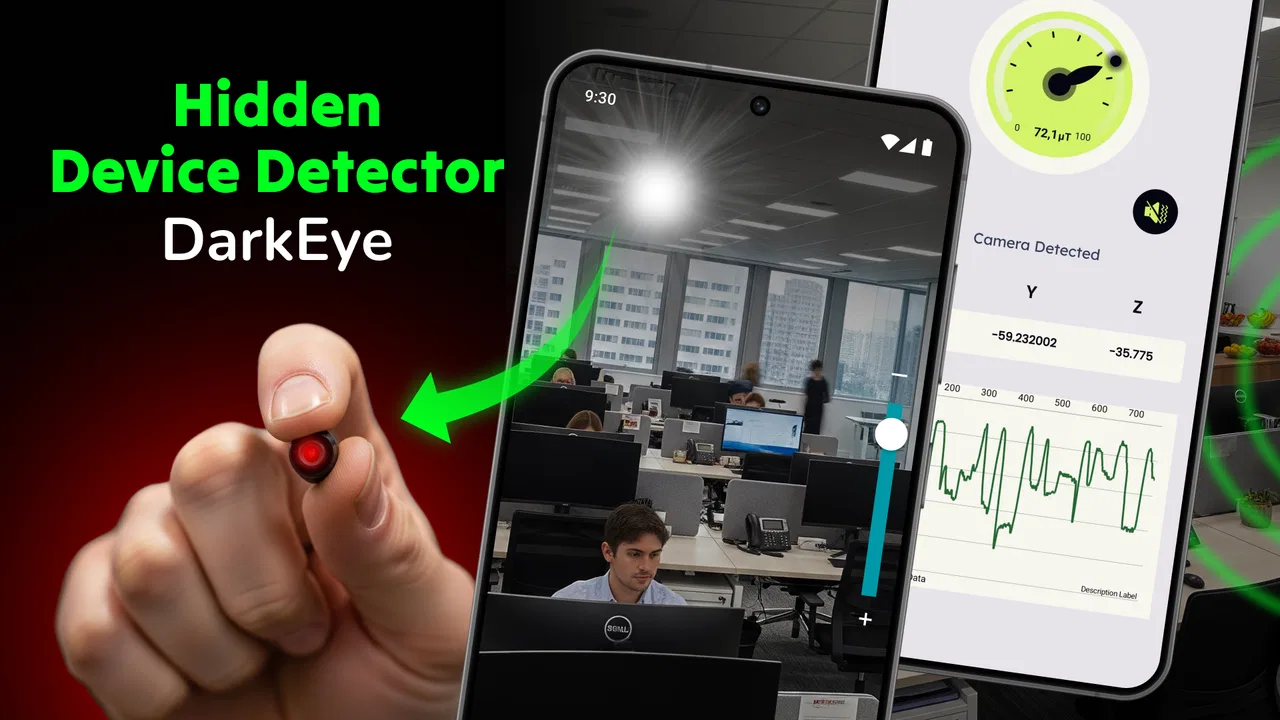
Detect Hidden Devices: DarkEye is a mobile utility designed to help users look for possible hidden cameras, microphones, and other suspicious electronic devices in nearby areas. It typically combines tools such as magnetic-field detection, infrared light inspection, and network scanning. It should be treated as an assistance tool rather than professional security equipment, because results can be affected by the phone model, surroundings, and other electronic devices nearby.
02How does DarkEye detect hidden cameras or devices?
The app uses sensors and inspection methods available on a compatible smartphone. Magnetic detection may identify unusual electromagnetic fields, while an infrared camera view can help reveal some infrared LEDs used by night-vision cameras. Network-related features may list unfamiliar devices connected to the same Wi-Fi network. These methods are useful for an initial check, but they cannot guarantee that every hidden device will be found.
03Is Detect Hidden Devices: DarkEye accurate and reliable?
DarkEye can be helpful during a basic inspection, but its accuracy depends heavily on the phone’s hardware, sensor quality, lighting conditions, Wi-Fi environment, and the type of device being searched for. Magnetic readings can be triggered by ordinary electronics, cables, speakers, or appliances, creating false alerts. For serious privacy or security concerns, confirm suspicious findings with a dedicated detector or qualified professional.
04Does the app require special permissions or an internet connection?
Depending on the features and your operating system, DarkEye may request access to sensors, the camera, nearby devices, location, or the local network. These permissions support functions such as infrared viewing, magnetic measurements, and Wi-Fi device discovery. Some tools may work offline, while network scanning generally requires an active connection. Review each permission carefully and avoid granting access that does not appear necessary.
05Can DarkEye find every hidden camera, microphone, or tracker?
No mobile app can guarantee detection of every concealed device. DarkEye may help identify certain cameras or electronics, especially when they emit infrared light, create a detectable magnetic field, or connect to the same network. However, wired, inactive, shielded, battery-powered, or remotely connected devices may remain undetected. Use the app as one part of a broader visual and physical inspection, not as definitive proof of safety.
Pros
- Quick scans can help spot suspicious cameras or microphones nearby.
- Simple interface makes the main detection tools easy for beginners.
- Useful flashlight helps inspect dark corners
- vents
- and small spaces.
- Magnetic-field readings may reveal unusual electronics in close proximity.
- Portable app is convenient for checking hotel rooms or rental properties.
Cons
- Results can be affected by Wi-Fi congestion and nearby electronic devices.
- Magnetic detection is unreliable with some phones and sensor hardware.
- It cannot guarantee that a room is completely free of hidden devices.
- Some features may require permissions that privacy-conscious users may question.
- False alarms are possible when scanning ordinary household electronics.

Detect Hidden Devices: DarkEye
Gallery